
Nav3 Navigator
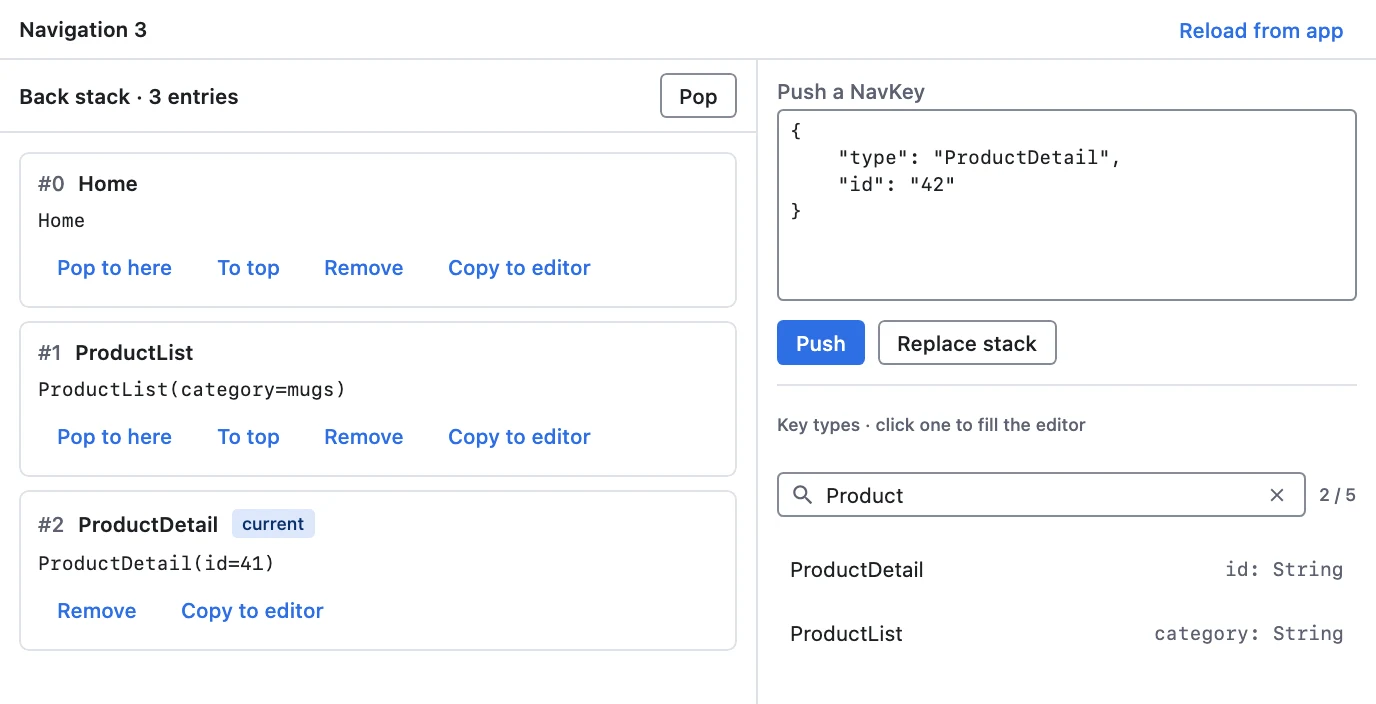
The Nav3 Navigator shows the Navigation 3 back stack of the app you are debugging and lets you drive it: push a screen, pop back, reorder entries, or replace the whole stack with an exact state, from the host or from an AI agent over MCP. It knows nothing about your screens: everything it shows and builds comes from the serializers your app already gives rememberNavBackStack.
Works with: any app that uses Navigation 3.
Setup
Install the host plugin
Install Nav3 Navigator from Settings → Plugins → Add Plugins → Official Plugins. To install it by Maven coordinates or from a file, see Host Settings → Plugins.
Add the agent to your app
dependencies {
    implementation("com.kitakkun.jetwhale:jetwhale-agent-runtime:<version>")
    implementation("com.kitakkun.jetwhale:jetwhale-nav3-agent:<version>")
}
A Navigation 3 app already declares how its NavKeys serialize, because saved state needs it. Hand the plugin that same declaration:
// The module you already pass to rememberNavBackStack.
val navKeyModule = SerializersModule {
    polymorphic(NavKey::class) {
        subclass(Home::class, Home.serializer())
        subclass(Detail::class, Detail.serializer())
    }
}

val nav3Plugin = JetWhaleNav3AgentPlugin(Nav3KeyCodec.openPolymorphic(navKeyModule))// No module needed: the hierarchy's own serializer.
val nav3Plugin = JetWhaleNav3AgentPlugin(Nav3KeyCodec.closedPolymorphic(Screen.serializer()))startJetWhale {
connection { /* ... */ }
plugins {
register(nav3Plugin)
}
}Then mark the back stack you want the host to see:
@Composable
fun App() {
    val backStack = rememberNavBackStack(
        configuration = SavedStateConfiguration { serializersModule = navKeyModule },
        Home,
    )

    nav3Plugin.TrackNavBackStack(backStack)

    NavDisplay(backStack = backStack, entryProvider = entryProvider { /* … */ })
}
TrackNavBackStack mirrors the stack to the host for as long as it is in composition, so put it where the back stack is created; for a single-stack app, at the root.
Several back stacks
An app that nests navigation registers each stack under its own id, and the host lets you pick one:
nav3Plugin.TrackNavBackStack(mainBackStack)                      // "main"
nav3Plugin.TrackNavBackStack(sheetBackStack, stackId = "sheet")
Using it
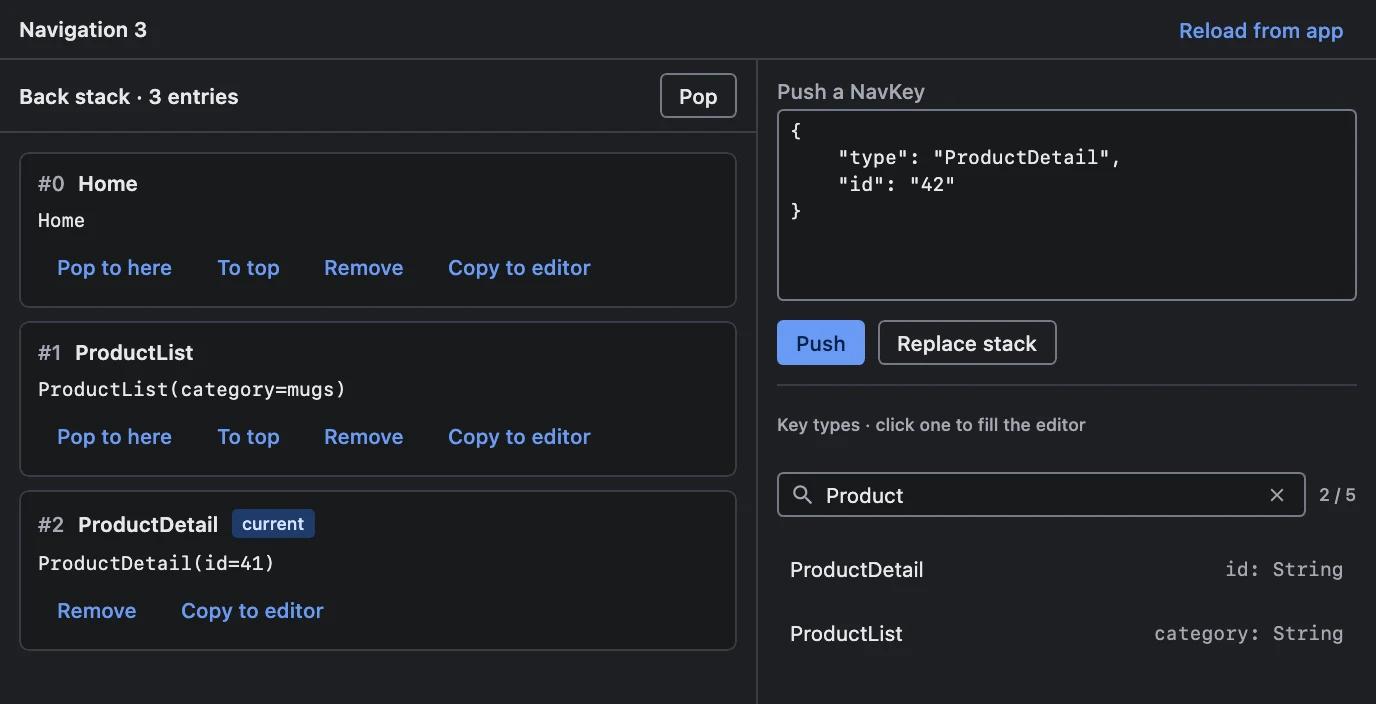
- The stack, live. Every entry with its index, type and
toString(), the last one markedcurrent, updated as the app navigates, whoever navigated it. - Per-entry actions. Pop to here, To top and Remove, including removing an entry from the middle, which changes where "back" lands without leaving the current screen.
- Push a NavKey. The right-hand pane lists the key types the app can construct, each with its fields and a ready-to-fill JSON template. Click one, edit the values, and Push, or Replace stack to make it the only entry. The filter above the list narrows it to the types whose name contains what you type, case aside — a simple name such as
Detail, or part of a qualified one. - Copy to editor. Any entry's key can be copied into the editor and pushed again, which also covers key types that are not in the list.
MCP tools
With the MCP server running, an AI agent can do the same through these tools. Each takes the sessionId of the app's session; stackId may be left out when the app has a single back stack.
| Tool | What it does |
|---|---|
com.kitakkun.jetwhale.nav3.getBackStack | The current stack(s), indexed, with each entry's JSON key |
com.kitakkun.jetwhale.nav3.listNavKeyTypes | The constructible key types, with fields and templates; query lists only the types whose name contains it |
com.kitakkun.jetwhale.nav3.pushNavKey | Navigate to a key (optionally inserting it below the top) |
com.kitakkun.jetwhale.nav3.popBackStack | Go back — by a count, or down to an index |
com.kitakkun.jetwhale.nav3.removeNavKeyAt | Drop one entry from the middle |
com.kitakkun.jetwhale.nav3.moveNavKeyToTop | Bring an entry already on the stack back to the top |
com.kitakkun.jetwhale.nav3.replaceBackStack | Put the app into an exact state in one step |
A typical flow is listNavKeyTypes → fill a template → pushNavKey. Every mutating tool returns the resulting stack, so the confirmation is already in hand.
While an agent runs a tool, the back stack is ringed for getBackStack and every tool that changes the stack, and the right-hand pane with the key types for listNavKeyTypes.
Limits
- It never leaves the stack empty.
NavDisplaycannot render an empty back stack, so an operation that would empty it is rejected and nothing is applied; the caller gets a message. - It never invents keys. A key is decoded by the app, with the app's serializers, and a type the app does not know is reported as an error.
- It never half-applies. Operations are validated as a unit: an out-of-range index or an undecodable key leaves the back stack exactly as it was.
Entries that survive an edit keep their identity, so Navigation 3 keeps the saved state and ViewModels behind the screens you did not touch.